

Sequential Function Chart (SFC)
An SFC program is a .sfc file: an ST POU whose body is an SFC … END_SFC
block written with IEC 61131-3’s own keywords, INITIAL_STEP, STEP,
TRANSITION, and ACTION. The text is the program, and the VS Code
extension projects it into the classic chart view where every gesture is a
structural edit to that text.
When to use it
Section titled “When to use it”Reach for SFC when the process has phases: batch sequences, startup and shutdown, state machines that would otherwise be a pile of latches. A step is a state, a transition is the condition that ends it, and actions drive outputs while a step is active, so the chart reads as the sequence of operations the process engineer wrote down. Continuous control belongs in FBD, interlocks in ladder, and algorithms in ST.
A chart, in text
Section titled “A chart, in text”examples/batch-skid/phases.sfc, trimmed of its CIP branch, its Hold/Resume
detour through Held, and its comments. It picks a recipe, charges two
dosing lines and runs the agitator simultaneously, converges once all three
are done, heats and holds at temperature, and transfers — with an abort
path off Heat.
PROGRAM BatchSequenceVAR_EXTERNAL    RecipeSel  : INT;  Start : BOOL;  Abort : BOOL;    Active     : Recipe;  Batch : BatchStatus;    TT201_Temp : REAL;    XV201A_Cmd : BOOL;  XV201B_Cmd : BOOL;    AgitateReq : BOOL;  HeatingActive : BOOL;  TransferReq : BOOL;    IdleLamp   : BOOL;  AbortLamp : BOOL;  PhaseName : STRING;    DoseTimeoutA : BOOL;END_VARVAR    recipes : RecipeTable;    holdTmr : TON;END_VARSFC
  INITIAL_STEP Idle:    N  IdleLamp;    R  AbortLamp;              (* clear the latch on return to Idle *)    N  SetIdle;  END_STEP
  STEP Prep:    P  LoadRecipe;              (* plain P — the same edge as P1 *)    N  SetPrep;  END_STEP
  STEP ChargeA:    N  XV201A_Cmd;    N  CheckDoseATimeout;       (* ACTION block, below *)    N  SetCharging;  END_STEP
  STEP ChargeB:    N  XV201B_Cmd;    N  SetCharging;  END_STEP
  STEP Agitate:    N  AgitateReq;    N  SetCharging;  END_STEP
  STEP ChargeADone: END_STEP  STEP ChargeBDone: END_STEP
  STEP Heat:    N  HeatingActive;    N  AgitateReq;    N  SetHeat;  END_STEP
  STEP Hold:    N  HeatingActive;    N  HoldTmr;                 (* ACTION: holdTmr(IN := Hold.X, PT := ...) *)    N  SetHold;  END_STEP
  STEP Transfer:    N  TransferReq;    N  SetTransfer;  END_STEP
  STEP Aborted:    S  AbortLamp;              (* latched until Idle resets it *)    N  SetAborted;  END_STEP
  TRANSITION t_start FROM Idle TO Prep := Start AND RecipeValid(RecipeSel);  END_TRANSITION
  (* simultaneous divergence: charge both lines and agitate together *)  TRANSITION t_prep FROM Prep TO (ChargeA, ChargeB, Agitate) := TRUE;  END_TRANSITION
  TRANSITION t_abort_a FROM ChargeA TO Aborted := Abort;  END_TRANSITION  TRANSITION t_a_done FROM ChargeA TO ChargeADone := Batch.ChargedA_L >= Active.AmountA_L;  END_TRANSITION  TRANSITION t_b_done FROM ChargeB TO ChargeBDone := Batch.ChargedB_L >= Active.AmountB_L;  END_TRANSITION
  (* simultaneous convergence: fires only once all three branches are done *)  TRANSITION t_charged FROM (ChargeADone, ChargeBDone, Agitate) TO Heat := TRUE;  END_TRANSITION
  (* alternative divergence: abort is declared first, so it has priority     over the normal Heat -> Hold progression *)  TRANSITION t_abort_heat FROM Heat TO Aborted := Abort;  END_TRANSITION  TRANSITION t_heat FROM Heat TO Hold := TT201_Temp >= Active.TempSP_C - 1.0;  END_TRANSITION
  TRANSITION t_settled FROM Hold TO Transfer := holdTmr.Q;  END_TRANSITION
  TRANSITION t_transferred FROM Transfer TO Idle := TRUE;  END_TRANSITION  TRANSITION t_resume FROM Aborted TO Idle := NOT Abort;  END_TRANSITION
  ACTION LoadRecipe:    recipes();                  (* first call loads the table; every call after is a no-op *)    Active := recipes.Recipes[RecipeSel];    Batch.Count := Batch.Count + 1;  END_ACTION
  ACTION CheckDoseATimeout:    DoseTimeoutA := ChargeA.T >= T#5M;  END_ACTION
  ACTION HoldTmr:    holdTmr(IN := Hold.X, PT := REAL_TO_TIME(Active.HoldSec * 1000.0));  END_ACTION
  ACTION SetIdle:     PhaseName := 'Idle';     END_ACTION  ACTION SetPrep:     PhaseName := 'Prep';     END_ACTION  ACTION SetCharging: PhaseName := 'Charge';   END_ACTION  ACTION SetHeat:     PhaseName := 'Heat';     END_ACTION  ACTION SetHold:     PhaseName := 'Hold';     END_ACTION  ACTION SetTransfer: PhaseName := 'Transfer'; END_ACTION  ACTION SetAborted:  PhaseName := 'Aborted';  END_ACTION
END_SFCEND_PROGRAM| Element | Form | Notes |
|---|---|---|
| Initial step | INITIAL_STEP Idle: … END_STEP | Exactly one per chart; active on the first scan |
| Step | STEP ChargeA: … END_STEP | Owns a retained BOOL, ChargeA.X, and a ChargeA.T elapsed time |
| Supervised step | STEP ChargeA (MAXTIME := T#5M, ERROR := ChargeA_Overrun): … END_STEP | Adds a retained overrun flag, ChargeA.ERR; see Step supervision |
| Transition | TRANSITION [name] FROM a TO b := <ST expr>; END_TRANSITION | FROM/TO take one step or a parenthesised list; the name is optional |
| Action block | ACTION LoadRecipe: <ST statements> END_ACTION | The body is Structured Text |
| Association | N XV201A_Cmd; or D XV201A_Cmd(T#3S); | A qualifier plus either an ACTION name or a declared BOOL variable; a timed qualifier takes a duration |
| Association, IEC form | XV201A_Cmd(N); or XV201A_Cmd(D, T#3S); | The standard’s own textual spelling, read as the same association; an omitted qualifier is N |
How a chart executes
Section titled “How a chart executes”Each step owns a retained BOOL slot, and the initial step’s is declared
:= TRUE, so a cold start finds exactly one step active. Every scan runs one
fixed-order pass: evaluate each transition against the pre-scan activity
snapshot, resolve which ones fire, clear the sources, set the targets, update
step timers, compute actions. Clears run before sets, so a self-loop
FROM S TO S leaves S active. Every transition reads the same snapshot, so
a token advances at most one step per scan, though several transitions can
fire in one scan when several tokens are live.
A transition is enabled when all of its FROM steps are active and its
condition is true. That one rule covers both branch forms:
- Alternative divergence is two or more transitions sharing a source step. Priority is declaration order, first highest, and a lower branch is suppressed only when a higher one sharing a source actually fires, so a convergence waiting on an inactive source cannot deadlock the branch below. Groups that overlap in a chain (a convergence sharing one leg each with several abort transitions) resolve the same way, one well-defined outcome per scan.
- Simultaneous divergence is
TO (Heat, Mix): one transition sets both targets and the token splits. Simultaneous convergence isFROM (Heat, Mix), enabled only when both sources are active.
Action qualifiers
Section titled “Action qualifiers”Every IEC 61131-3 action qualifier compiles: N, S, R, P1, P, P0,
and the timed L, D, SD, DS, SL. N is active exactly while the
step is. S sets the target and R clears it, each once, on the scan its
step activates, which is the abort/reset pattern above. P1 and P fire
once on the rising edge, P0 once on the falling edge.
The timed qualifiers take a duration, a TIME literal or a TIME
variable: D Detergent(T#3S);, or in the standard’s own spelling
Detergent(D, T#3S);. Each association gets its own timer, started when its
step activates.
| Qualifier | Active | Ends |
|---|---|---|
L time limited | from the step’s activation, for the duration | at the duration, or when the step is left first |
D time delayed | once the step has been active for the duration | when the step is left |
SD stored, then delayed | the duration after the step activates, even if the step was left meanwhile | at an R on the same target |
DS delayed, then stored | once the step has been active for the duration (never, if it was left sooner) | at an R on the same target |
SL stored, time limited | from the step’s activation, for the duration, even after the step is left | at the duration, or an R |
These are the standard’s action-control semantics, with one difference:
like nautilus’s S/R, an R acts once, on its step’s activation scan,
and clears the SD, DS and SL latches on its target as well as an S.
An SL that has run its time stays latched, so it does not run again on
the step’s next activation until an R clears it. That is the standard’s
SL (its latch has R as its only reset), and CODESYS behaves the same.
N, pulse and timed associations targeting the same BOOL variable are
OR-combined: the variable is held TRUE while any of them is active and
written FALSE once, on the scan the last one drops, so HeatingActive —
N-qualified from both Heat and Hold above — only goes low the scan the
chart leaves both of them, for Transfer or Aborted.
An association writes its variable only on the scans it acts. A step that is
not active never touches it, and between those scans the variable belongs to
whoever else writes it. When an ACTION body assigns the same variable, the
association wins while it acts (it is applied after the bodies in the scan):
every scan its N step is active, the one activation scan of an S or R,
the one scan of a pulse, the window of a timed qualifier. The ACTION owns it the rest of the time, so an
R X on an abort step and an ACTION that sets X on a normal step coexist.
naut check warns on every such pair.
Action bodies are ST, and only ST. A body driven by a level qualifier (any
but the pulses: a timed qualifier’s window is a level) runs
one extra scan on the falling edge of its active signal, so a body written
against step activity shuts its outputs down: on that final scan
holdTmr(IN := Hold.X, …) runs once more with Hold.X false, resetting the
timer, clean for re-entry. A P1 body has no final scan.
Step.T compiles to a hidden TON, and only for steps whose .T is read.
Both .X and .T are legal in conditions and action bodies, and so is
Step.ERR on a supervised step.
Timing no qualifier expresses (an output on between two times, a delay that
counts only while a condition holds) is an N association to an ACTION
that reads the step’s elapsed time: Valve := Fill.X AND Fill.T >= T#3S;.
Step supervision
Section titled “Step supervision”A step can carry a maximum active time. Put it in the step’s attribute list, between the name and the colon:
STEP Fill (MAXTIME := T#60S, ERROR := FillOverrun):  N FillValve;END_STEP
(* the abort has priority over the normal way out *)TRANSITION FROM Fill TO Aborted := Fill.ERR;END_TRANSITIONTRANSITION FROM Fill TO Wash := LevelPct >= FillSP;END_TRANSITION
When the step has been active longer than MAXTIME, its retained flag
Fill.ERR goes TRUE: one scan after Fill.T reaches the limit, the
reading of a CODESYS maximum step time or an S7-GRAPH supervision
T > limit. The flag stays set after the step is left, so the abort step
can still read why it was entered, and clears on the step’s next
activation. Nothing else happens on its own: the chart moves only where a
transition says, so the overrun’s consequence (Fill.ERR in an abort
transition, a fault code in an ACTION) is in the chart where it can be read.
ERROR := FillOverrun is optional. It names a BOOL variable, normally a
manifest tag, that mirrors Fill.ERR every scan. That tag is how the alarm
engine sees the overrun; a definition binds to it like any other condition:
alarms: defs: - { id: FillOverrun, tag: FillOverrun, name: "Fill ran past its maximum time", priority: high }MAXTIME takes a TIME literal. The attribute list is the one place this
departs from the standard’s textual SFC, which has no step supervision; it
sits in the step header because the limit belongs to the step, not to any
action, and the chart editor keeps it on every edit.
lang/conformance/sfc-step-maxtime pins every edge, the alarm included.
Structural checks
Section titled “Structural checks”naut check runs the chart-shape checks before the ST hop;
naut sfc check <file> runs them alone.
Errors: duplicate step, action, or transition names; no INITIAL_STEP, or
more than one; a FROM/TO naming a step that does not exist; an empty
condition; an association naming neither an ACTION block nor a declared
variable; a .X/.T reference to an unknown step; an unknown qualifier
(the message lists every supported one and the Step.T recipe); a timed
qualifier with no duration, or an untimed one given one; a bad step attribute
(MAXTIME that is not a TIME literal, ERROR that is not a declared
variable, or ERROR without MAXTIME); Step.ERR on a step with no
MAXTIME.
Warnings: a non-initial step that no transition targets (unreachable); a
dead-end step that no transition sources, which a terminal step may be on
purpose; a simultaneous convergence whose sources are not reachable from a
common simultaneous divergence; a variable driven by a qualifier association
and also assigned in an ACTION body, with the rule that decides between
them.
The chart then transpiles to ST and compiles like any other program, the line
map putting a type error in a condition on its TRANSITION line and one in an
action body on the offending statement’s own line inside the ACTION block.
In the editor
Section titled “In the editor”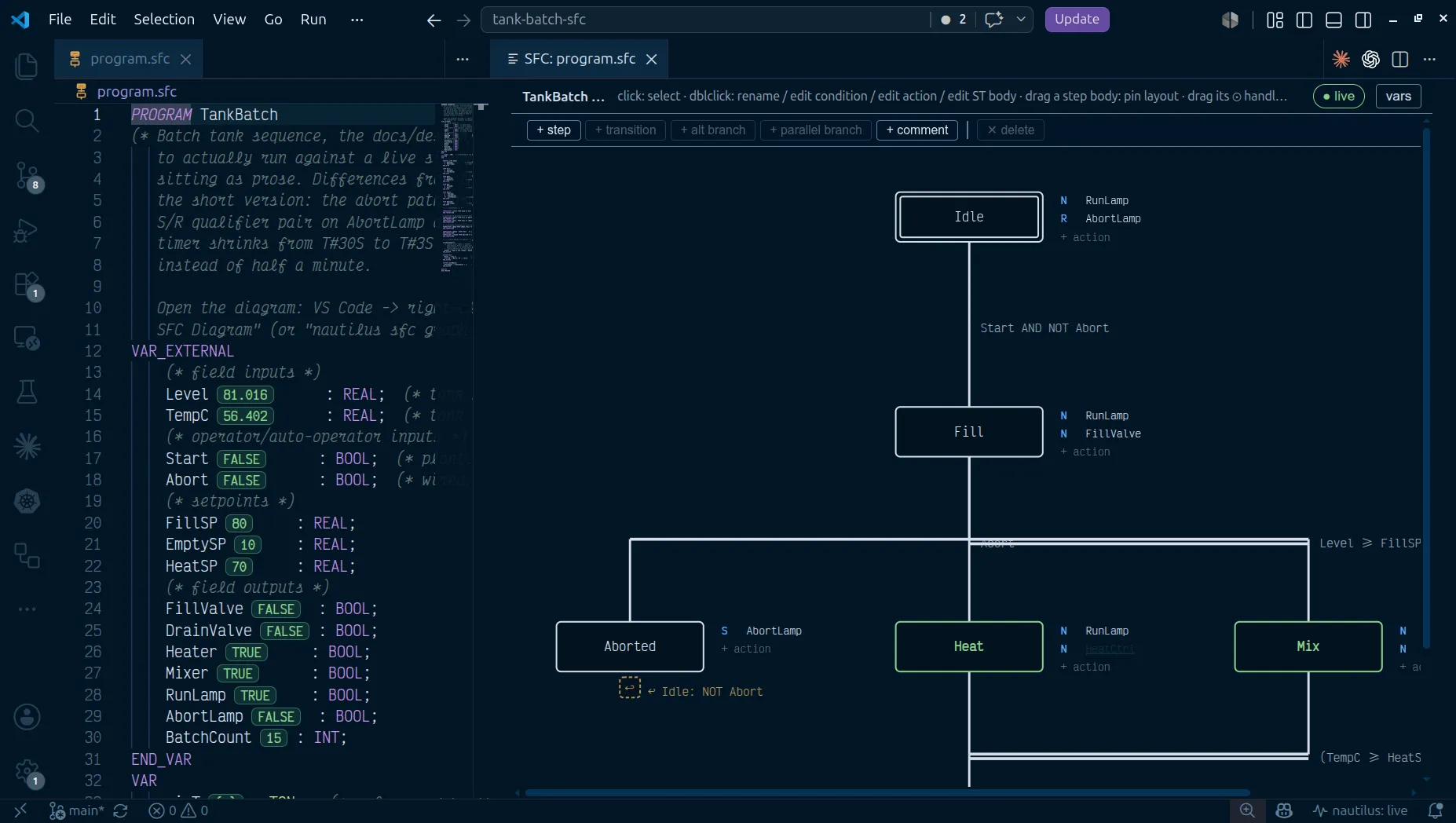
Right-click a .sfc file and pick Open With → SFC Diagram, or run
nautilus: Open SFC Diagram Preview beside the text. Steps draw as boxes,
double-bordered for the initial step, with their associations tabled
alongside. Transitions draw as bars across the flow line, single for a normal
or alternative transition and double for a simultaneous one; a transition
back up the chart becomes a compact ↩ jump glyph. Layout follows the
chart’s topology; drag a step to pin it, and “auto layout” clears every pin.
Every gesture is a structural op resolved in Go into minimal text edits: add
a step or transition, branch an alternative or simultaneous path off one,
drag a step’s connect handle onto another step to wire a transition, edit a
condition, step name, association, or ACTION body in place.
f686456 · VS Code 1.139.1 · PASS · S09 on the proof pageWith a step selected, + step adds the next step under it along with the transition that reaches it; with nothing selected it adds a free step.
f686456 · VS Code 1.139.1 · PASS · S04 on the proof page+ transition goes to an existing step, or to other… (new step), which
creates that step too. + alt branch adds another transition out of the
selected step, or out of the selected transition’s source. + parallel
branch widens the selected transition’s TO with a new step (a
simultaneous divergence), and + join adds another step to its FROM,
making it a simultaneous convergence:
TRANSITION FROM (PostRun, Alternate) TO Idle.
f686456 · VS Code 1.139.1 · PASS · S07 on the proof pageA join draws as a double bar under every leg it waits for, even when one leg has more steps than the other.
Every transition can carry a name, typed in the add form or with F2 on a selected transition, and the chart draws it above the condition. Alternative branches out of one step are numbered by priority, which is their order in the file. ◀ priority and priority ▶ (or Alt+← / Alt+→) move the selected branch earlier or later, so an abort drawn after the main path can still win.
The arrow keys walk the chart along its flow: ↓ from a step to its
transition and on to the next step, ↑ back, ←/→ to the
neighbouring step or alternative branch, and → from a step into its
actions. Enter edits the selection in place and Del deletes it. An
association naming an action that does not exist yet opens the ST-body
editor on double-click, and saving it writes the ACTION block. The action
field also takes the qualifier, name and time in columns
(D Detergent T#3S); text it cannot read stays in the field with the form
it expects. The vars panel declares VAR_EXTERNAL, VAR and
VAR CONSTANT entries, with an initial value. A new, empty .sfc file is a
naut check warning until its diagram’s initialize writes the program.
Whether the joined steps are legs of one divergence is a naut check
warning, not a refusal. Each add is one edit and one undo, and the new step
scrolls into view. A transition
whose FROM or TO no longer resolves stays on the canvas as a red chip
with a retarget popover, and diagnostics show as you type without blocking a
save. With a controller reachable, the active step outlines and its name
highlights, read from the retained step slot exposed in /api/state.
An action association’s tooltip ends with its variable’s description, and Shift+F12 on a selected step or association, or right-click → Find All References, opens the References view on that name.
nautilus: Diff SFC Diagram (vs git HEAD) and (vs Controller) overlay added, removed, and changed elements on the chart. (between git revisions…) does the same for any two commits in the file’s history, or one commit and the working tree.
Tooling
Section titled “Tooling”naut new --language sfc scaffolds a project with a starter chart.
naut check gates it in CI, and naut test runs the same
*_test.yaml acceptance tests every other language uses, in virtual time.
naut sfc graph <file> emits the render model as JSON, each transition
carrying its derived kind (normal/alt/simDiverge/simConverge), and
naut sfc edit applies one structural op to source read on stdin.
Step activity, stored flags, pulse edge memories, step timers, timed-qualifier
timers and latches, and overrun flags are all
retained VAR slots, so an online edit preserves the
live token and every timer, and a running batch does not restart. Renaming a
step is the exception: the renamed step’s slot is a new name, so its token
resets, listed in the swap report the way an FB-instance rename is.
Pull Program from Controller and naut pull bring a field edit back
into the .sfc file for review in git diff.
Not supported
Section titled “Not supported”- Macro steps and charts nested inside a step. Charts are flat.
- Explicit numeric transition priorities; priority is declaration order.
- Instruction List action bodies. Action bodies are ST.
- Indicator variables in an association (
Valve(N, Ind);) and on transitions (TRANSITION t FROM S0 TO S1 (Ind) := ...).naut checkrefuses each withindicator variables are not supported(in an association) orindicator variables on a transition are not supported, followed by the forms it does take. - Import of vendor SFC (Rockwell
.L5Xroutines, Siemens GRAPH, CODESYS). - Machine-checked token conservation for pathological branch topologies. The structural checks cover the detectable cases.