

Ladder Diagram (LD)
IEC 61131-3 defines ladder graphically. nautilus defines it as text: a .ld
file holds rungs written left to right along the power rail, in a grammar
with the standard’s semantics and no vendor dialect. The VS Code extension
projects that text into a ladder editor where every gesture writes back to
the same file.
When to use it
Section titled “When to use it”Ladder fits boolean logic that gets reviewed by asking which contacts passed
power: interlocks, permissives, latches, motor seal-ins, annunciators and
alarm horns. It is the language most control engineers read fastest, and one
rung is one line of git diff.
Loops and signal conditioning read better as Function Block Diagram. Math, arrays, and plant physics belong in Structured Text. Mix them per task against one tag store.
A rung, in text
Section titled “A rung, in text”A trimmed slice of examples/lift-station/permissives.ld — the duty
mapping and one pump’s permissive/start rungs; P102’s mirror the same
shape:
PROGRAM PermissivesVAR_EXTERNAL    LeadIsP101 : BOOL;  LeadReq : BOOL;  LSHH101 : BOOL;  LSLL101 : BOOL;    P101_Req        : BOOL;    P101_SealFail   : BOOL;  P101_OverTemp : BOOL;  P101_VfdFault : BOOL;    P101_Permissive : BOOL;    P101_Mode       : INT;   P101_Running  : BOOL;    P101_RunCmd     : BOOL;  P101_FailToRun: BOOL;  P101_LockedOut: BOOL;    P101_Avail      : BOOL;  ResetFaults   : BOOL;END_VARVAR    m101 : MotorStarter;END_VARLD  // duty mapping + high-high override, one rung: LSHH forces the call  // regardless of the sequence or who's lead  RUNG p101req    [ LeadIsP101 LeadReq | LSHH101 ] ( P101_Req )
  RUNG p101perm (* a dry well (LSLL) blocks both pumps, not just the lead *)    /P101_SealFail /P101_OverTemp /P101_VfdFault /LSLL101 ( P101_Permissive )
  // every BOOL input bound by name: no free input for rung power, so the  // call sits alone on the rail — see docs/functions.md "Power pins in ladder"  RUNG p101start    m101:MotorStarter(Mode := P101_Mode, AutoReq := P101_Req, Permissive := P101_Permissive,                       RunFb := P101_Running, Reset := ResetFaults,                       Run => P101_RunCmd, FailToRun => P101_FailToRun,                       LockedOut => P101_LockedOut)
  RUNG p101avail (* Off (Mode 0) is never available, same as a failed, locked-out, or blocked pump *)    /P101_FailToRun /P101_LockedOut P101_Permissive /EQ(P101_Mode, 0) ( P101_Avail )END_LDEND_PROGRAM
Every element the grammar accepts:
| Element | Text | What it does |
|---|---|---|
| NO contact | Tag | passes power when Tag is TRUE |
| NC contact | /Tag | passes power when Tag is FALSE |
| Rising-edge contact | +Tag | one scan of power on Tag’s 0→1 transition (an implicit R_TRIG) |
| Falling-edge contact | -Tag | one scan of power on Tag’s 1→0 transition (an implicit F_TRIG) |
| Parallel branch | [ a | b ] | OR of its legs; each leg is a series, and branches nest |
| Function contact | EQ(P101_Mode, 0) | passes power when the call returns TRUE |
| Negated function contact | /EQ(P101_Mode, 0) | passes power when the call returns FALSE; / negates any BOOL term, /t1.Q included |
| Block in the rung | m101:MotorStarter(Mode := P101_Mode, …) | power drives its power-in pin, and continues from its power-out pin |
| Output capture | Run => P101_RunCmd | binds an output pin to a variable, inside the block’s parentheses; the standard’s own => form, for a BOOL pin exactly as for a timer’s elapsed time |
| Output coil | ( Tag ) | Tag := the rung condition, every scan |
| Set coil | ( S Tag ) | latch: Tag := Tag OR condition |
| Reset coil | ( R Tag ) | unlatch: Tag := Tag AND NOT condition |
| Rising-edge coil | ( P Tag ) | Tag is TRUE for one scan when the rung condition rises |
| Falling-edge coil | ( N Tag ) | Tag is TRUE for one scan when the rung condition falls |
Contacts and coils take the same accessor references FBD takes, so array
elements and struct members address directly: Levels[2], PIT_001.VALUE.
A rung header carries a (* … *) comment; full-line // comments inside
the block are diagram notes.
How a rung evaluates
Section titled “How a rung evaluates”Series elements AND together and branch legs OR, so
[ Start | Run ] /Stop ( Run ) compiles to
Run := AND(OR(Start, Run), NOT Stop). That is the seal-in: Start energizes
Run, Run’s own contact holds it in, Stop drops it out.
Coils sit at the right end of a rung. A rung needs at least one coil,
function block or assignment. A block can sit anywhere in the rung: power
continues from its output pin, so A t1:TON(PT := T#5S) B ( Lamp ) sets
Lamp to t1.Q AND B. Without a coil the rung ends at its last block, so
A B t1:TON(PT := T#5S) is a complete rung whose only output is t1.Q, read
elsewhere; anything after that block would drive nothing and is an error.
Several coils share one
condition, evaluated once and fanned out. (When a coil writes a tag the
condition reads, as in /Lamp ( Lamp ) ( Horn ), the condition is held in a
generated BOOL, <rung>__power, which shows among the program’s locals.) A rung with only a coil is driven
by the rail, so ( AlwaysOn ) assigns TRUE. Rungs evaluate
top to bottom within a scan, so a coil written on one rung reads back as a
contact on the next rung in the same scan.
Power is boolean, so anything gating it has to return BOOL. The six
comparisons do. Numeric functions do not, and ADD(TempC, 0.0) as a contact
is a compile error rather than a pass-through; numeric work goes inside a
comparison’s arguments, as GE(ADD(Base, Bias), Limit).
When a block sits in a rung, power drives one input pin and leaves from one
output pin; every other pin is named in the parentheses. TON, TOF and
TP use IN and Q, CTU uses CU, CTD uses CD, R_TRIG and
F_TRIG use CLK, SR uses S1/Q1, RS uses S/Q1. Passing the
power pin yourself (t1:TON(IN := x)) is an error, because power owns it.
Coils assign BOOL only. To store a timer’s elapsed time or a counter’s
value, use the standard’s output binding at the call site, Run => P101_RunCmd above. Any instance output is also readable as inst.Pin
anywhere, including as a contact: m101.FailToRun reads the same way a
plain BOOL tag would, without needing a => capture first.
Edge contacts and edge coils are unnamed in the text. The compiler derives a stable instance name from the rung name, the tag, and the position among repeats in that rung, so the edge’s retained state survives an unrelated edit elsewhere in the program.
Types, functions, and blocks
Section titled “Types, functions, and blocks”LD transpiles in one hop to the FBD netlist, which transpiles to ST. Ladder
inherits the whole chain rather than reimplementing it: the built-in
operator, function and function-block vocabulary, user FUNCTIONs and
FUNCTION_BLOCKs from library .st files, arrays and structs through
accessor references, and typed diagnostics mapped back to the rung.
A user block drops into a rung the way a TON does. Power lands on EN if
the block declares one, otherwise on the first BOOL VAR_INPUT the call
does not bind by name, and continues from ENO or the first BOOL
VAR_OUTPUT. Every other pin is bound in the parentheses, with =>
capturing outputs. Instance state persists across scans, and an online edit
carries it by name and type.
Blocks can be written in ladder, too. A .ld file may hold
FUNCTION_BLOCKs whose bodies are rungs, and a .ld file with no
PROGRAM is a project library, the same rule that makes a PROGRAM-less
.st one:
FUNCTION_BLOCK MotorStarterVAR_INPUT Mode : INT; (* 0 Off, 1 Hand, 2 Auto *) AutoReq : BOOL; Permissive : BOOL; RunFb : BOOL; Reset : BOOL;END_VARVAR_OUTPUT Run : BOOL; FailToRun : BOOL;END_VARVAR t1 : TON; END_VARLD RUNG run [ EQ(Mode, 2) AutoReq | EQ(Mode, 1) ] Permissive /FailToRun ( Run ) RUNG fail Run /RunFb t1:TON(PT := T#5S) ( S FailToRun ) RUNG reset Reset ( R FailToRun )END_LDEND_FUNCTION_BLOCKThis is what ladder has instead of a JSR: a subroutine with pins rather
than shared tags, and retained state per instance. Two pumps are two
instances of one block, each with its own seal-in and its own t1. The
VAR_* sections are ordinary POU declarations, VAR_IN_OUT included, so
a ladder block can take a UDT by reference. examples/lift-station/lib/motor.ld
is the whole feature (this listing trims its lockout counter) —
instantiated twice, once per pump, from permissives.ld above. See
Function blocks, libraries, and tasks.
In the editor
Section titled “In the editor”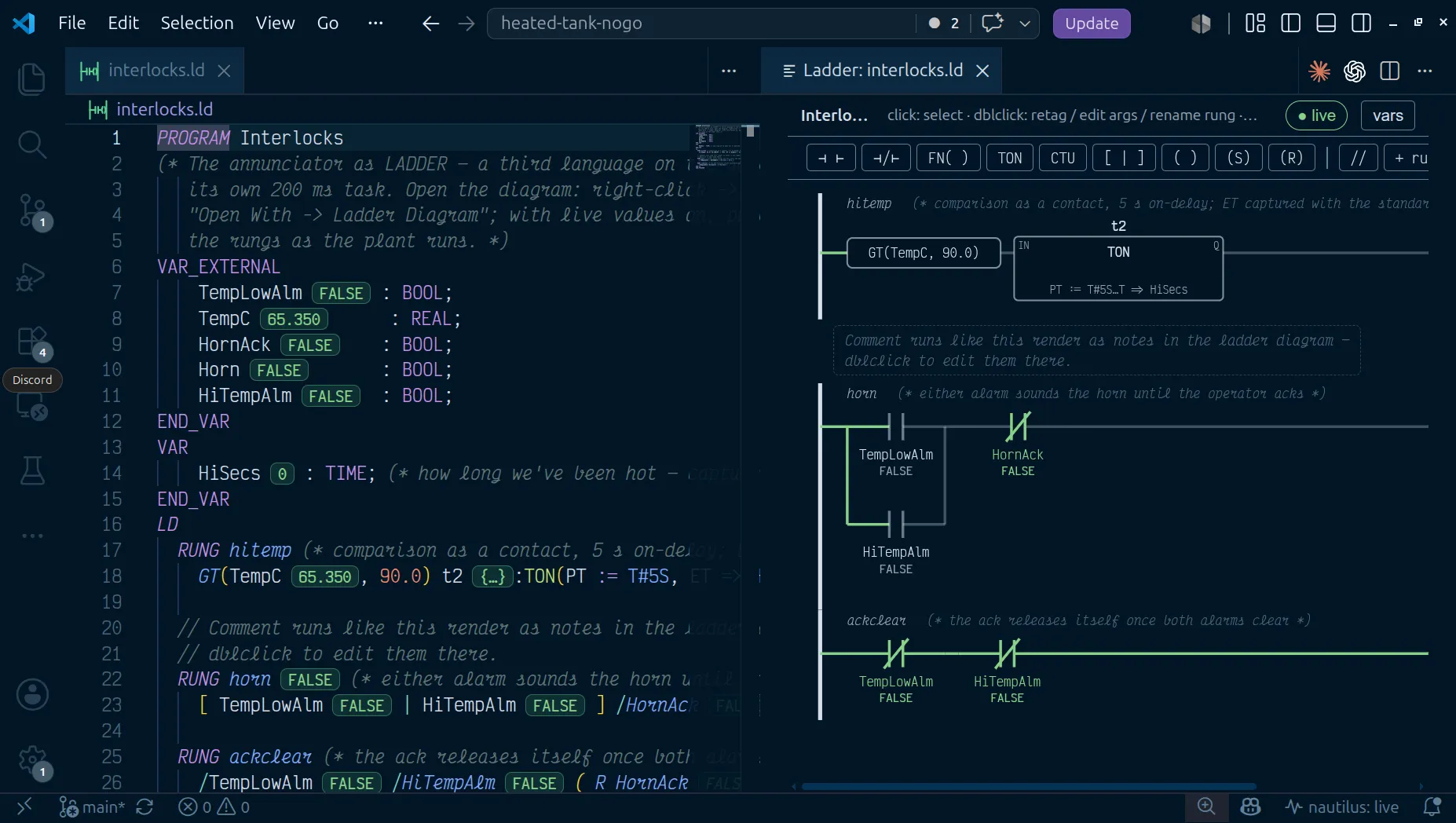
Right-click a .ld file and choose Open With → Ladder Diagram to use
the diagram as the editor, or run nautilus: Open Ladder Diagram Preview
for text on the left and rungs on the right. Layout is canonical, computed
from the source, so no coordinates land in your diffs. Editing gestures
resolve through the Go compiler into minimal text edits:
-
A palette of NO contact, NC contact, rising- and falling-edge contact (P / N: the Logix ONS habit), function contact, parallel branch, and output/set/reset coil. Click to append at the selection, or drag onto a rung.
Verified 25 Oct 2026, 08:03 UTC on f686456· VS Code 1.139.1 · PASS · L03 on the proof page -
FB… opens a picker over the standard blocks and the project’s own function blocks, prefilled with the next free instance name, and inserts the call at the end of the selected rung.
Verified 25 Oct 2026, 08:03 UTC on f686456· VS Code 1.139.1 · PASS · L05 on the proof page -
Double-click a contact or coil to retag it (typing
+Tagor-Tagmakes the contact an edge,/Tagan NC one), a function contact to rewrite the call, a block’s body to edit its arguments or its header to rename the instance, the rung name to rename it, and the(* … *)slot to write a rung comment.Verified 25 Oct 2026, 08:03 UTC on f686456· VS Code 1.139.1 · PASS · L03 on the proof page -
Nflips a contact between NO and NC,Pcycles it NO → P → N → NC,Mcycles a coil through output, set and reset,Bwraps the selection in a parallel branch,Deldeletes, and Ctrl+X/C/V cut, copy and paste. A pasted block instance gets a fresh name. With a rung’s name selected, copy takes the whole rung: it pastes below the selected rung with the next name (m1→m2) and its block instances renamed the same way.Verified 25 Oct 2026, 08:03 UTC on f686456· VS Code 1.139.1 · PASS · L11 on the proof page -
A multi-leg OR in one step: Ctrl- or Shift-click several elements of one series and press
O(or the toolbar’s OR). They become one branch with a leg each,a b c→[ a | b | c ]. A branch selects as a whole when you click its rails;Othen adds a leg, andDeldeletes it. -
Drag an element to reorder it or move it to another rung. A contact dropped in the coil zone is refused, and so is a coil dropped mid-series.
Verified 25 Oct 2026, 08:03 UTC on f686456· VS Code 1.139.1 · PASS · L07 on the proof page -
+ rungadds a rung,//adds a comment note, and the variables panel declares, renames (double-click the name) or removes a declaration without leaving the diagram. It also lists the block instances the rungs declare by their calls (m1 : MotorStarter, with the rung), and Escape closes it. In aFUNCTION_BLOCKit declares the block’s pins (VAR_INPUT,VAR_OUTPUT,VAR_IN_OUT) as well as locals; renaming a pin also renames it in the calls in that file. -
The amber declare … offer lists every name a rung uses that its POU does not declare. A
nautilus.yamltag is in scope in the program as it is, so it is not listed (unless the manifest gives it no type, when the offer’sVAR_EXTERNALtypes it); any other name in the program is offered asVAR; inside aFUNCTION_BLOCKit offers a pin,VAR_INPUTfor a name the rungs read andVAR_OUTPUTfor one a coil or=>writes. The type comes from the use: a counter’sCV => CountisINT, a contact isBOOL.
With a controller reachable, live values paint power flow: contacts and coils show their state (an edge contact shows its one-shot’s output, so it lights for the one scan it fires), the wires show whether power reaches that far, and comparisons evaluate locally. An in-rung block reads its real output pin from the controller. Anything unresolvable renders neutral.
Each contact and coil shows its tag’s description on a second line under
the operand, the way Studio 5000 does. The description is the desc from
nautilus.yaml (or a tag file), or a trailing (* comment *) on the
variable’s declaration. The element’s tooltip carries the full text, and
the nautilus.diagram.showDescriptions setting turns the second line off.
To find every other place a tag is read or written, select its contact,
coil or block and press Shift+F12, or right-click it and choose Find
All References. The References view lists every program that uses the
tag, on the diagram files’ own lines, plus its declaration in the manifest.
This is the ladder’s cross-reference, the equivalent of Studio 5000’s
Ctrl+E.
nautilus: Diff Ladder Diagram (vs git HEAD) and (vs Controller)
overlay the committed or running rungs on the working ones, marking added,
changed and removed elements in cyan, amber and red. Green already means
power here. (between git revisions…) lists every commit that touched
the file and overlays any two of them the same way, so the change between
last month’s program and today’s, or between any two releases, reads as
rungs. Pick the working tree as the newer side and the overlay follows your
edits. The git diffs work on a Rockwell .L5X export as well.
Tooling
Section titled “Tooling”naut check # compile every .st/.fbd/.ld/.sfc; errors land on the rungnaut test # acceptance tests, on the virtual clocknaut ld graph permissives.ld # the ladder render model as JSONnaut ld edit # apply one structural edit op, from JSON on stdinnaut check composes the line maps back through both hops, so a type
error in the ST a rung produced reports at that rung’s RUNG line. The
language server does the same live.
Online edits treat .ld as the program source. Download, diff against the
controller, and naut pull all move the ladder text itself, so the
program a controller reports compares 1:1 with the file in git. See Online
edits.
A rung change reviews as a rung:
RUNG p101req [ LeadIsP101 LeadReq | LSHH101 ] ( P101_Req ) [ LeadIsP101 LeadReq | LSHH101 | ManualCall ] ( P101_Req )naut new my-plant --template minimal --language ld scaffolds a project
whose program is ladder.
Not supported
Section titled “Not supported”- Jumps and labels. No
JMP,JMPC,LBL,RET. Rungs run top to bottom, every scan. - Master control relay zones. No
MCRor zone bracketing. - Negated coils.
( /Tag )is rejected; invert with NC contacts or use a reset coil. - Coils inside a branch, or ahead of a later block. The output zone is contiguous at the rung’s right end. Split such a rung into one rung per output leg.
- Vendor instruction sets. The vocabulary is the IEC built-ins in the language reference, and nothing else.
See also
Section titled “See also”- Coming from Studio 5000: every Logix instruction and its nautilus form.
- Not supported, by design
- Language reference — power flow, power pins, and every built-in.
- Function blocks, libraries, and tasks
- Online edits
- Testing
- Structured Text · Function Block Diagram · Sequential Function Chart