

Function Block Diagram (FBD)
An FBD program is a text file. .fbd source is a netlist of named wires
driven by blocks, coils that write variables, and function-block instances,
all inside an otherwise ordinary ST POU. The VS Code extension projects that
netlist into the diagram a controls engineer expects, and an edit made on the
diagram is written back into that same file as text. Values flow left to right
through blocks, which is what makes FBD fit continuous control: PI loops,
filters and scaling, selection and limiting, signal conditioning in stages.
When to use it
Section titled “When to use it”Reach for FBD when the logic is mostly analog. A temperature loop with an anti-windup clamp, a rate-of-change calculation, a rolling average, a setpoint selector: these read as a chain of blocks, and the diagram shows the chain.
Interlock logic that is almost entirely contacts and coils reads better as
ladder. A step sequence with holds and aborts belongs
in SFC. Anything needing branching, loops, or CASE is
Structured Text work; the netlist has no
control flow. Tasks can mix languages, one program file each, so a project
usually uses more than one.
A netlist, line by line
Section titled “A netlist, line by line”This is examples/lift-station/level.fbd, complete:
PROGRAM LevelControl(* LIC-101: wet-well level to pump speed, plus the high level alarm   seal-in. Open the diagram: right-click -> "Open With -> FBD Diagram". *)VAR_EXTERNAL    LIT101_Level   : REAL;    LevelSP        : REAL;    Kp             : REAL;    Ki             : REAL;    Kd             : REAL;    MinSpeedHz     : REAL;    MaxSpeedHz     : REAL;    LevelDtS       : REAL;    LeadReq        : BOOL;    SpeedRef       : REAL;    HandSpeedHz    : REAL;    HighLevelAlmSP : REAL;    HighLevelAlm   : BOOL;
    P101_RunCmd   : BOOL;    P101_InHand   : BOOL;    P101_SpeedCmd : REAL;    P102_RunCmd   : BOOL;    P102_InHand   : BOOL;    P102_SpeedCmd : REAL;END_VARFBD  // LIC-101: level -> speed. AUTO free-wheels (CV tracks CV_MAN, bumpless  // on return) whenever no pump is called — LeadReq false parks the loop  // instead of integrating error for a pump that isn't running. Direct  // acting: level above setpoint calls for MORE speed.  lic : PID(AUTO := LeadReq, PV := LIT101_Level, SP := LevelSP,            KP := Kp, KI := Ki, KD := Kd,            CV_MIN := MinSpeedHz, CV_MAX := MaxSpeedHz,            DIRECT := TRUE, DT := LevelDtS)  SpeedRef := lic.CV
  // Per-pump speed command: stopped -> 0 Hz; running in Auto -> the loop's  // output; running in Hand -> the operator's hand-speed setpoint.  P101_SpeedCmd := SEL(P101_RunCmd, 0.0, SEL(P101_InHand, SpeedRef, HandSpeedHz))  P102_SpeedCmd := SEL(P102_RunCmd, 0.0, SEL(P102_InHand, SpeedRef, HandSpeedHz))
  // LAH-101: seal-in with hysteresis — latches at HighLevelAlmSP, clears  // 5 % below it, so a level sitting right on the setpoint doesn't chatter  // the alarm on and off every scan.  above = GE(LIT101_Level, HighLevelAlmSP)  below = LE(LIT101_Level, SUB(HighLevelAlmSP, 5.0))  HighLevelAlm := AND(OR(above, HighLevelAlm), NOT below)END_FBDEND_PROGRAM
Everything before FBD and after END_FBD is plain ST: the POU header and
its VAR sections, compiled by the same front end as a .st file. The body
accepts these forms.
| Element | Written as | What it is |
|---|---|---|
| Wire | above = GE(LIT101_Level, HighLevelAlmSP) | a named block output, defined once |
| Coil | SpeedRef := lic.CV | writes a variable; the target may be an array element or struct member, as in TempHist[1] := TempC |
| FB instance | lic : PID(AUTO := LeadReq, PV := LIT101_Level, ...) | declares the instance and calls it in one statement; lic : PID alone declares it, lic(PV := ...) calls it later |
| Pin read | lic.CV | an output pin of an FB instance |
| Output binding | ET => Elapsed | IEC’s formal-call output form, for capturing a non-BOOL pin such as ET or CV into a variable |
| Negation | NOT high | inline pin negation, drawn as the IEC circle on the pin |
| Constant | 5.0, T#10S, TRUE, 'ok' | a literal input chip |
| Accessor | TempHist[2], M.Speed | array element or struct member, as an input or a coil target |
| Network | NETWORK 'high-level alarm' | starts the next numbered network; the title is optional (below) |
| EN / ENO | sp = LIMIT(EN := Run, MN := 0.0, IN := x, MX := 9.0, ENO => ok), t1.ENO | execution control on any block (below) |
Full-line // comments inside the body render as notes on the diagram.
Statements may end with ; or just a newline. A standard function’s inputs
are positional, LIMIT(0.0, x, 9.0), or all named by their standard names,
LIMIT(MN := 0.0, IN := x, MX := 9.0).
How a diagram evaluates
Section titled “How a diagram evaluates”Compilation transpiles the netlist to equivalent ST and runs it through the
ST front end, so FBD inherits the whole type system, the standard library,
and the diagnostics. Errors map back to the exact .fbd line.
Wires are pure combinational expressions. A wire is inlined at every place it is read, so fan-out duplicates an expression rather than creating shared state, and wires must be acyclic: a wire that reads itself, directly or through another wire, is a compile error (“combinational loop through wire”).
Variables carry state. That is where feedback lives. HighLevelAlm := AND(OR(above, HighLevelAlm), NOT below) reads the same variable the coil
writes, which is a seal-in latch and evaluates exactly as a PLC evaluates
one. The same mechanism is what a shift register or any other “read early
in the body, write later” pattern rests on: a variable read early in the
body carries the value its coil wrote on the previous scan.
Statements evaluate in source order, with one adjustment: a function-block
call is emitted ahead of any statement that reads its output pins, so
lic.CV reads this scan’s result no matter where lic sits in the file.
Ties keep source order. With networks, that rule applies within
each network and the networks run in order. There is no other reordering
and no way to override it.
Networks
Section titled “Networks”A body can be divided into numbered networks, the way TIA Portal and CODESYS
lay out an FBD block. A NETWORK line starts one, with an optional title,
and it runs to the next:
FBD NETWORK 'LIC-101: level to pump speed' lic : PID(AUTO := LeadReq, PV := LIT101_Level, SP := LevelSP, DT := LevelDtS) SpeedRef := lic.CV NETWORK 'LAH-101: high level alarm' // latches at the setpoint, clears 5 % below it above = GE(LIT101_Level, HighLevelAlmSP) below = LE(LIT101_Level, SUB(HighLevelAlmSP, 5.0)) HighLevelAlm := AND(OR(above, HighLevelAlm), NOT below)END_FBDNetwork 1 runs to completion, then network 2. Within a network the
FB-before-reader rule holds; a read of a later network’s FB output sees the
previous scan’s value. The numbers are positions: the file holds only the
order, so moving or inserting a network renumbers nothing in the text.
Statements before the first NETWORK line are an untitled first network,
and a body with no NETWORK line is one network, exactly as before.
EN/ENO: execution control
Section titled “EN/ENO: execution control”Any block takes EN (BOOL, TRUE when unbound) and gives ENO, as IEC
61131-3 defines them. While EN is FALSE the block does not run: a
function’s result is not written, so the variable it drives keeps its
value, and a function block’s outputs and internal state hold. ENO is
EN AND no error; DIV and MOD report a zero divisor through it. A
block with EN/ENO must drive a variable (a coil, directly or through its
named wire), and its ENO reads like a pin: t1.ENO, or sp.ENO for a
block on wire sp, can feed a coil or the next block’s EN. The details,
and the ST form, are in the language reference.
Types, functions, and blocks
Section titled “Types, functions, and blocks”FBD uses the same vocabulary as Structured Text. AND, OR, XOR, ADD
and MUL take two or more inputs (the + pin in the editor adds one);
SUB, DIV, MOD and the comparisons take exactly two; MOVE is a
one-input pass-through for wiring. Standard functions such as LIMIT, SEL,
SQRT and CONCAT are written as blocks with positional inputs, and
standard function blocks such as TON, CTU and R_TRIG are instantiated
with named pins. An FB input left out of the call keeps its value (its
declared initial value until something writes it). User-defined TYPE
structs work as inputs and coil targets.
The whole list is in the language reference.
A FUNCTION_BLOCK you write yourself instantiates the same way a TON does:
r1 : RateOfChange(IN := TempC, DT := RepDtS) TempRate := r1.OUTRateOfChange is authored in an ST library file and composed ahead of the
program, the same way examples/lift-station/lib/pump.st’s RuntimeMeter
is. A FUNCTION_BLOCK can carry an FBD body as well, or even a ladder one —
examples/lift-station/lib/motor.ld’s MotorStarter is authored as rungs
and instantiated once per pump — because a .fbd/.ld/.st file with no
PROGRAM is a project library, and its blocks instantiate from any
language. Write a block once, call it from whichever language fits the
logic. See function blocks, libraries, and
tasks.
In the editor
Section titled “In the editor”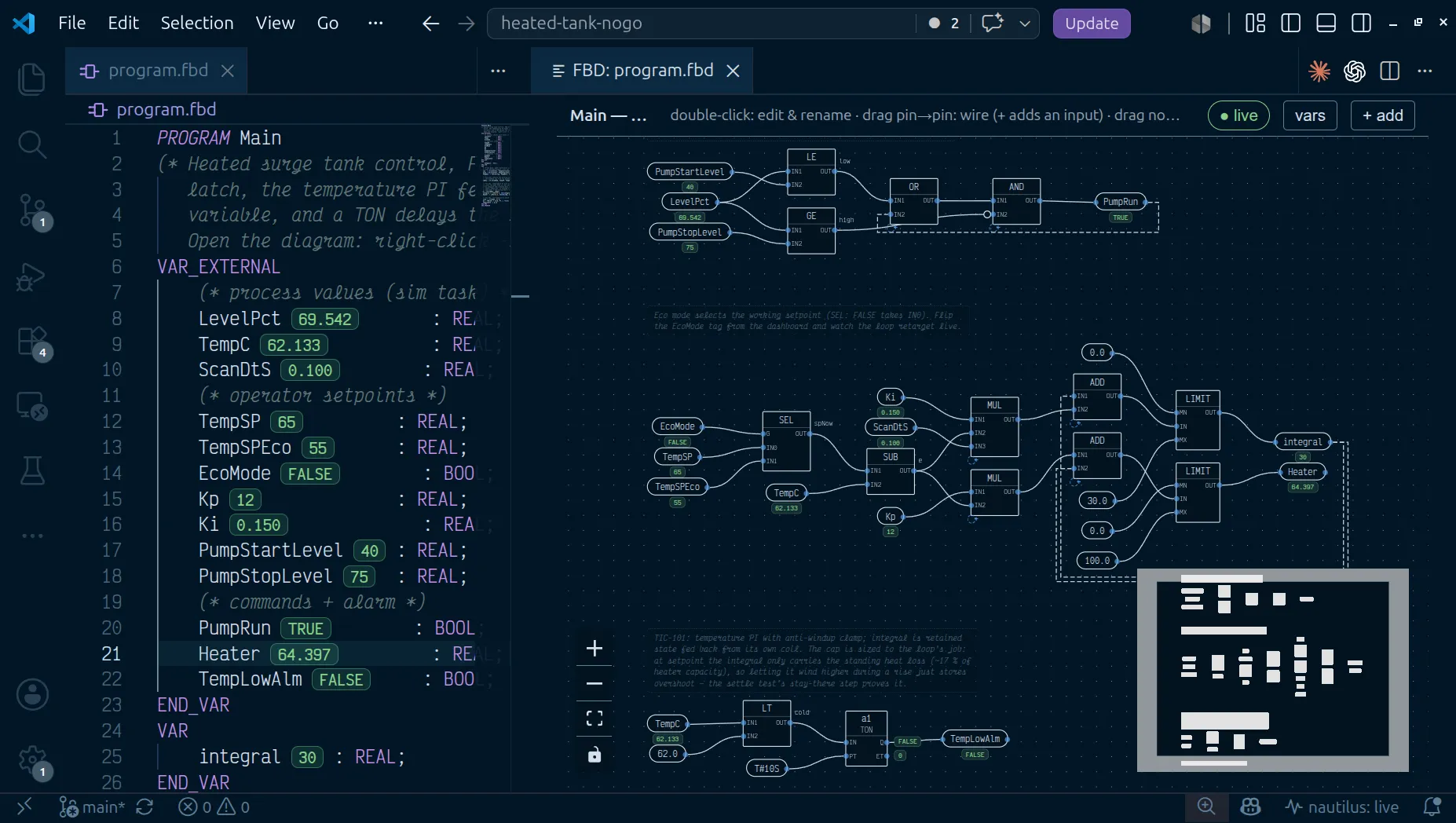
Right-click a .fbd file and choose Open With → FBD Diagram to use the
diagram as the editor itself, or run nautilus: Open FBD Diagram Preview
to open it beside the text, which then updates as you type. With a .fbd
open as text, the editor title’s Open as Diagram Editor button swaps the
tab for the diagram and carries unsaved edits across; from the diagram,
Show Source opens the text beside it.
b3fbc32 · VS Code 1.139.1 · WARN · rig nightly · C15 on the proof pageStructural gestures are resolved by the Go compiler into minimal text edits
against the file: double-click a constant to retype it or a block to rename
it, click an input pin to toggle NOT, drag an output onto a pin to rewire,
and delete a selected node.
f686456 · VS Code 1.139.1 · PASS · F08 on the proof pageThe + add palette inserts statements: networks, block-to-wire (its
function field offers the project’s own FUNCTIONs by name, beside the
standard ones), function blocks from the picker (every required input an
open _ pin; an input with a declared default stays unbound), coil, timer,
counter, comment, bare reference chips, and variable declarations. An
insert lands one column to the right of the selected element, or wherever
you double-click on empty canvas (which opens the palette there), moving
down to the first clear place if that spot is taken; with nothing selected
it goes where auto-layout puts it.
Each network draws as a numbered band with its title, and every statement
carries a small badge with its execution order in the network. Click a
band’s header and + add inserts into that network; its ▲ ▼ buttons move
the network, + adds one after it, ✕ removes the NETWORK line (the
statements join the network above), and a double-click renames it.
EN/ENO pins draw when they are bound; the small EN toggle on a block
shows them as open pins to wire.
f686456 · VS Code 1.139.1 · PASS · X28 on the proof pageA variable chip’s or block instance’s tooltip ends with the tag’s
description (its desc in nautilus.yaml, or the comment on its
declaration). Shift+F12 on a selected chip, instance or FB pin, or
right-click → Find All References, opens the References view on that
name.
Layout is computed from topology by default. Drag a node to pin it and the
position is stored in a (* @layout *) comment that the compiler skips,
right after END_FBD so it never sits between statements; auto layout
clears every pin. Once you have dragged anything in a network, an insert
leaves that network’s blocks where they are; a network you never arranged
re-flows around a new block.
The editor opens fitted to the window when the whole diagram is readable that way. A bigger one opens at a readable zoom on its first network; Ctrl+0 or the fit button shows everything.
f686456 · VS Code 1.139.1 · PASS · F11 on the proof pageThe vars button opens a panel listing every header declaration, wired or
not, with its section, its live value, an unused marker when nothing in the
logic references it, and an amber no tag badge on a VAR_EXTERNAL with
no matching tag on the controller. A read of a tag that was never written
faults the scan, so clear that badge before you download.
With a controller reachable, live values paint onto the diagram: value pills on variable chips and on FB output pins, alongside the inline values in the text editor.
nautilus: Diff FBD Diagram (vs git HEAD) overlays the committed and
working-tree diagrams, coloring added, removed and changed blocks and wires.
(vs Controller) compares against the program a live controller is running.
(between git revisions…) picks any two commits from the file’s history, or
one commit and the working tree, and overlays those.
Tooling
Section titled “Tooling”naut check # compile .fbd (and .st/.ld/.sfc); the CI gatenaut test # acceptance tests, virtual clocknaut fbd graph f.fbd # the diagram render model as JSONnaut fbd edit # apply one structural edit op; stdin/stdout JSONA controller running an FBD program serves and accepts the .fbd text
itself, so download, text diff, naut pull and the sync status bar work
as they do for .st. A warm swap migrates retained state by name and type,
so a PID’s integral or a running TON keeps its value through the edit; see
online edits. An edit routes to a task by PROGRAM
name, so a task’s own .fbd downloads without disturbing another task’s
program running alongside it.
Because the source is text, a wiring change reviews as a diff:
above = GE(LIT101_Level, HighLevelAlmSP)above = GE(LIT101_Level, SUB(HighLevelAlmSP, 2.0))Not supported
Section titled “Not supported”- Authoring a
FUNCTIONin FBD. Functions are ST; blocks may be FBD or ladder. - Execution-order overrides. Order is network order, then source order plus the FB-before-reader rule within a network.
- Control flow: no
IF,CASE, or loops in the netlist. - Inline arithmetic in an array index. Compute the index on a named wire
first, then use
Levels[i]. - Defining the same wire twice, or a wire that feeds itself. Both are compile errors.
See also
Section titled “See also”- Language reference — evaluation semantics and every built-in operator, function, and function block.
- Function blocks, libraries, and tasks
- The tag model
- Online edits
- Testing
- Structured Text, Ladder, Sequential Function Chart